Domain Storytelling
What is Domain Storytelling?
Domain Storytelling is a collaborative modeling technique used primarily in domain-driven design (DDD) to capture and understand business processes, requirements, and domain knowledge. It involves domain experts (such as business stakeholders, users, or subject matter experts) telling real-world stories about their work, while a facilitator records these narratives visually using a simple pictographic language. This approach transforms abstract domain insights into concrete, visual representations that help teams align on how people, systems, and processes interact. Unlike traditional modeling methods that might rely on complex diagrams or UML, Domain Storytelling emphasizes simplicity, conversation, and iteration to build a shared understanding without technical jargon.
The core idea is to focus on “stories” as concrete examples of business scenarios, told from an actor’s perspective. These stories highlight actors (people or systems), activities (actions they perform), and work objects (items like documents, data, or tools they interact with). It’s agile and visual, making it accessible to non-technical participants, and it’s often used to identify bounded contexts, establish a ubiquitous language (shared terminology across the team), and bridge gaps between business and technical sides. It’s particularly effective for exploring “as-is” (current) processes and envisioning “to-be” (future) improvements, and it pairs well with other DDD practices like Event Storming.
Benefits of Domain Storytelling
- Fosters Collaboration: Brings together diverse stakeholders (e.g., developers, product owners, business analysts) to learn from each other and uncover hidden assumptions or misunderstandings.
- Builds Shared Understanding: Visual stories make complex domains tangible, helping teams quickly grasp key concepts, workflows, and pain points.
- Agile and Iterative: Stories evolve during sessions, allowing for rapid feedback and refinement without needing perfect diagrams upfront.
- Domain-Focused: Emphasizes real examples over abstractions, leading to better software design aligned with business needs.
- Versatile: Applicable to various scales, from fine-grained tasks (e.g., a single user action) to coarse-grained overviews (e.g., end-to-end processes).
The Pictographic Language
The visual language is intentionally simple to keep the focus on discussion rather than drawing skills. It avoids symbols for conditions, loops, or branches—instead, tell separate stories for variations. Key elements include:
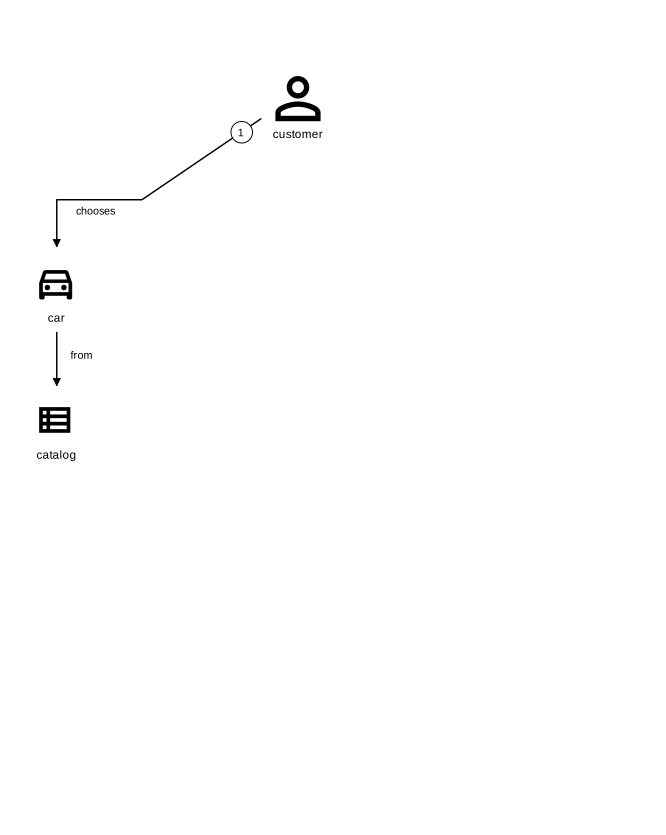
- Actors: Represented by stick figures or icons (e.g., a person for a user, a computer for a system). Label them with roles like “Cashier” or “Customer.”
- Work Objects: Icons for items involved, such as a document (paper sheet), data (database symbol), or physical objects (e.g., a ticket). Use custom pictograms that fit your domain—compile a set as you go.
- Activities: Arrows connecting actors and objects, labeled with verbs in the domain’s language (e.g., “suggests seats”). Number arrows sequentially to show the story’s flow.
- Annotations: Optional notes for details like assumptions or comments (e.g., “in English language”).
Tools for drawing: Start with a whiteboard, sticky notes, or paper for in-person sessions. For digital, use tools like Miro, Lucidchart, or specialized ones like the Domain Story Modeler. Hand-drawn styles keep it approachable.
Step-by-Step Guide to Doing Domain Storytelling
Here’s a practical guide to conduct a Domain Storytelling session effectively. Aim for 1-2 hour workshops with 4-8 participants. Repeat sessions to refine and expand stories.
- Prepare the Session:
- Identify participants: Include domain experts (who know the business) and facilitators/moderators (e.g., developers or analysts to guide and draw).
- Define scope: Choose a specific scenario or process (e.g., “How a customer buys a movie ticket”). Start broad for overviews or narrow for details.
- Set up materials: Whiteboard, markers, sticky notes (for actors/objects), or digital tools. Prepare a legend of basic pictograms.
- Establish ground rules: Use the domain’s language; focus on concrete examples; no judgments during storytelling.
- Tell the Story:
- Have the domain expert narrate a concrete example step-by-step, like “The customer approaches the cashier and asks for tickets.”
- As they speak, the facilitator draws: Place an actor, connect with an arrow labeled with the activity, add work objects, and number the step.
- Keep it sequential: Describe what happens in chronological order, from start to end. Avoid “if-then” branches—note them for separate stories.
- Visualize and Refine:
- Retell the story: The facilitator reads back the drawn story aloud to confirm accuracy. The expert corrects or adds details (e.g., “Add that we check for subscriptions here”).
- Iterate: Rearrange icons, add annotations, or erase as needed. Evolve the diagram collaboratively until everyone agrees.
- Capture variations: After the “happy path” (ideal scenario), tell “what-if” stories (e.g., “What if the customer has a subscription?”) as separate diagrams.
- Explore and Expand:
- Ask probing questions: “What happens next?” “Who else is involved?” “What tools do they use?”
- Switch granularity: Start with a coarse-grained “big picture” story, then drill into fine-grained sub-stories.
- Document: Take photos or export digital versions. Note key terms for a ubiquitous language glossary.
- Analyze and Apply:
- Identify insights: Look for boundaries (e.g., where processes hand off), pain points, or opportunities for improvement.
- Transition to design: Use stories to inform DDD elements like aggregates, events, or user stories for development.
- Follow up: Share with the team, solicit feedback, and iterate in future sessions.
Tips for Doing It the Best
- Focus on Conversation Over Perfection: The goal is understanding, not a polished diagram. Encourage open dialogue to surface assumptions.
- Use Real Examples: Base stories on actual events or typical days to keep them grounded and meaningful. Avoid hypotheticals initially.
- Keep Sessions Short and Focused: Limit to one or two stories per session to maintain energy. Schedule follow-ups for depth.
- Adapt Pictograms: Customize icons to your domain (e.g., a film reel for a movie show) for better relevance, but keep them consistent across stories.
- Combine with Other Techniques: Pair with Event Storming for event-focused views or user story mapping for prioritization.
- Handle Remote Sessions: Use collaborative tools like Miro or Jamboard to mimic whiteboards.
- Avoid Overcomplication: If a story gets too branched, split it. Aim for clarity—stories should be readable at a glance.
- Measure Success: After sessions, check if the team has a clearer shared language and if stories lead to actionable software improvements.
- Only one story: Do not create deicison branches, stick to just one story per use case or branch.
By following this approach, you’ll turn domain knowledge into visual, actionable insights that drive better software. If you have a specific domain or example in mind, I can help tailor a sample story.