
Pull Requests Are Not the Best Thing You Can Do
I like to say that software engineering is about being able to reason about the design of the code. Therefore, a code review is a discussion about the design of the program between two developers or software engineers.
If anyone is still doing reviews for code style and conventions I think something is off, because these days we have plenty of great tools to check for a lot of things, quality metrics, code style checkers, architectural rule checkers and more. Everything that can be automated should be automated.
So the code review should focus on a discussion about the design of the program. Does it align with architectural goals? Does it align with your quality attributes, Service Level Objectives and other metrics? Is it maintainable, understandable and extendible if needed?
A review should also look for security issues and bugs, however, this can be considered part of the design and should be covered by tests. If you know that something needs to comply with certain security requirements, the tests should ensure that. So you’ll review if the tests are sufficient for these requirements.
Unfortunately, there are still people who review for code style conventions and similar things that can be fully automated easily. The other issue is that you need at least a few skilled engineers to do a proper (design) review.
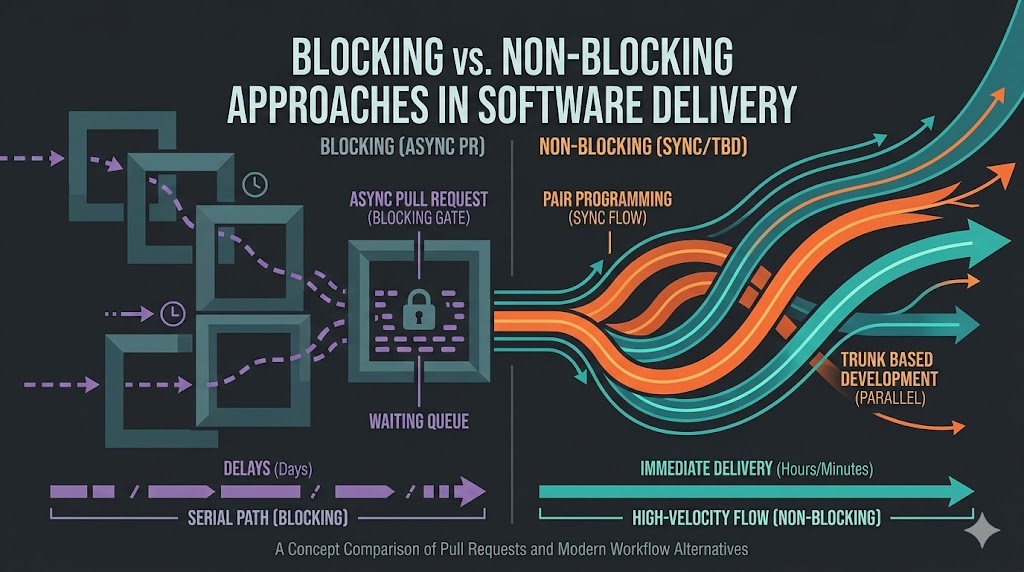
The Problem with Pull Requests: Async Blocking
To understand the present it is always a good idea to look into the past. I recommend you read this article by Daniel Smith. In a nutshell, pull requests (or merge requests if you prefer) are not a new thing but go as far back as 1991, when they were done manually with the GNU diff tool.
Here is a worst case scenario where the developers are in different timezones, which is not that uncommon in larger projects. Also, staggered working hours, where one developer starts at 08:00 and another at 10:00, can already cause additional delays.
But not only timezones cause trouble, very often people complain about having no time for code reviews. Well, if you do code reviews and you know they’re blocking, they should probably be a priority unless the work you’re prioritizing over the review is really critical.
sequenceDiagram
    participant Dev as Developer (Timezone A)
    participant Rev as Reviewer (Timezone B)
    participant Repo as Repository

    Note over Dev,Repo: Day 1 - Morning in Timezone A
    Dev->>Repo: Create branch & commit changes
    Dev->>Repo: Open Pull Request (PR)
    activate Repo
    Repo-->>Rev: Notify reviewer
    deactivate Repo

    Note over Dev,Repo: Developer waits...
    Note over Rev: End of day in Timezone B - Reviewer offline

    Note over Dev,Repo: Day 1 - Evening in Timezone A (Developer offline)
    Note over Rev: Day 2 - Morning in Timezone B
    Rev->>Repo: Review PR & request changes

    Note over Rev,Repo: Reviewer waits...
    Note over Dev: Day 2 - Morning in Timezone A (Developer starts day)
    Dev->>Repo: Update PR with fixes

    Note over Dev,Repo: More waiting if further review needed...
    Rev->>Repo: Approve PR
    Dev->>Repo: Merge PR

    Note over Dev,Rev: Total delay: Potentially 1+ days due to timezone differences and async waits
Alternatives to Code Reviews
Pair Programming
Instead of doing an asynchronous review, you can do pair programming, which is basically a review in real time as the coding happens.
This might seem counterintuitive because it seems like you spend 2x the effort because you have now two people working on it at the same time. But what does change here? Your “review” becomes a synchronous process, two people discuss and learn from each other while building the software in real time. By doing pair programming you remove the asynchronicity from the process that slows us down.
It is hard to find a lot of data on this, but my assumption is that pair programming is more time-efficient and cost-efficient for the company than code reviews. A code review blocks the delivery of the task until it has been reviewed and, in the worst case, requires multiple rounds of review before it is accepted.
The downside of pair programming is that you’ll need to pair a more experienced person with a less experienced person, if the less experienced person is the driver, to ensure a good outcome. So having two juniors reviewing each other will not yield the desired results. On the other hand, less experienced people will get basically training when collaborating with more senior developers.
sequenceDiagram
    autonumber
    participant Dev1 as Developer 1 (Driver)
    participant Dev2 as Developer 2 (Navigator)
    participant IDE as Local Codebase/IDE
    participant Repo as Mainline Repository

    Note over Dev1,Dev2: Session Starts (Synchronous Collaboration)

    Dev1->>IDE: Types code implementation
    activate Dev2
    Dev2-->>Dev1: Reviews code in real-time

    alt Typo/Bug Found
        Dev2-->>Dev1: Points out mistake ("Line 15 has a typo")
        Dev1->>IDE: Corrects typo immediately
    else Design Question
        Dev2-->>Dev1: Suggests architectural change ("Should this be a helper function?")
        Dev1<<->>Dev2: Discusses and agrees on design
        Dev1->>IDE: Refactors code instantly
    end
    deactivate Dev2

    Note over Dev1,Dev2: Feature Complete

    Dev1->>IDE: Runs automated tests (Both observe)
    IDE-->>Dev1: Tests Pass

    Dev1->>Repo: Commit & Push Changes (e.g., to Mainline)
    Note over Dev1,Repo: Task Complete. Knowledge Shared. No waiting.
There is the paper “The Case for Collaborative Programming” by John T. Nosek, which confirms what I have written in the paragraphs before. Read it if you’re interested in a deeper analysis. The paper shows that there is an increase in productivity but also raises questions:
Can two average or less-experienced workers collaborate to perform tasks that may be too challenging for each one alone? Can a company bring a product to market substantially earlier by using collaborative programming? Can collaborative programming using worldwide commodity programming resources offer a competitive edge?
Trunk Based Development (TBD)
If you have a very high degree of automation and automated quality checks and the engineers have the required skills, trunk based development could be an alternative as well. If you can’t reliably catch errors and ensure quality before code goes into production, you certainly should not go for trunk based development.
Trunk based development means that you push/pull multiple times a day to your master or main branch. If you use “short lived feature branches”, you are not really doing TBD.
- Change in small increments
- Isolate work in progress with feature toggles.
- Validate changes after each small change
Feature flags are not prescribed but you also want them when you do trunk based development, so that a half done feature implementation is not active in the production code base.
There are very different experiences and opinions about when you can or should do TBD. I personally do not think it is a good idea to go for TBD without good tests, especially if the majority of your developers’ skills aren’t great or they lack required discipline. If you want to take the risk and if you can ensure they’ll learn from it, and you can quickly roll back or address the issues that are likely to happen, then TBD might be an option under these circumstances.
I highly recommend you watch this video by Dave Farley.
Ship Show Ask
Ship Show Ask is a process proposed by Martin Fowler. Because he wrote a complete article about it I suggest you read it and I will provide here only a brief overview of it. It does not completely remove the need for Code Reviews but tries to speed up delivery. A pre-requisite here is however that you have good automated tools to check the code.
This process defines basically three scenarios for code delivery:
Ship - Use Ship for straightforward changes like adding features with established patterns, fixing simple bugs, updating documentation, or applying prior feedback. The process involves making changes directly on the mainline without review or merging delays, relying on Continuous Integration techniques for safety. Benefits include rapid integration and shipping, maintaining a “ready to ship” mentality akin to traditional Continuous Integration, avoiding stale branches and low-frequency integration issues.
Show - Apply Show when seeking feedback on changes such as new approaches, patterns, refactors, or interesting bug fixes, while still wanting quick deployment. The process entails creating a branch, opening a pull request for automated checks and team notification, then merging immediately without awaiting feedback, allowing post-merge conversations. Benefits include fast live changes with opportunities for team learning, inclusion in discussions—especially for remote or asynchronous work—and fostering a feedback culture without blocking progress.
Ask - Choose Ask for changes needing input, like uncertain approaches, code improvements, experiments, or when pausing work, such as ending the day. The process requires branching, opening a pull request for discussion and feedback before merging, utilizing modern code review tools for conversations, possibly team discussions. Benefits involve gathering collective insights to refine work, avoiding suboptimal solutions from premature commits, and supporting collaborative problem-solving, particularly for juniors or novel tasks.
Those are not mutually exclusive: A high-performing team might use Ship for a documentation fix, Pair for a complex architectural change, and Ask for a junior’s first major feature—all in the same afternoon.
flowchart TD
    A[Change Needed] --> B{Type of Change?}

    B -->|Straightforward: Simple features, bug fixes, docs| C[Ship]
    B -->|Needs feedback but quick deploy: New patterns, refactors| D[Show]
    B -->|Uncertain/Collaborative: Novel approaches, experiments| E[Ask]

    subgraph Ship Flow
    C --> F[Commit directly to mainline]
    F --> G[Run CI tests automatically]
    G --> H[Deploy immediately]
    H --> I[Feedback optional, post-deploy]
    end

    subgraph Show Flow
    D --> J[Create branch & commit]
    J --> K[Open PR for notifications/checks]
    K --> L[Merge immediately]
    L --> M[Deploy changes]
    M --> N[Post-merge feedback/discussions]
    end

    subgraph Ask Flow
    E --> O[Create branch & commit]
    O --> P[Open PR]
    P --> Q[Gather pre-merge feedback/reviews]
    Q --> R[Address changes if needed]
    R --> S[Merge after approval]
    S --> T[Deploy]
    end

    style C fill:#90EE90,stroke:#333
    style D fill:#ADD8E6,stroke:#333
    style E fill:#FFD700,stroke:#333
sequenceDiagram
    autonumber
    participant Dev as Developer
    participant Repo as Mainline Repository
    participant CI as CI/CD System
    participant Team as Team/Reviewers

    Note over Dev: Code Change Complete Locally

    alt PATH: SHIP (Straightforward change)
        Note over Dev: Decision: Simple fix, docs, or known pattern? Yes.
        Dev->>Repo: Push/Commit directly to Mainline
        activate CI
        Repo-->>CI: Trigger automated build/test pipeline
        CI-->>Repo: Build/Tests Pass -> Auto-Deploy
        CI-->>Dev: Notify Success (Task Done)
        deactivate CI

    else PATH: SHOW (Interesting change, ready for deploy)
        Note over Dev: Decision: Good for team to see, but safe to go live. Yes.
        Dev->>Repo: Push to Feature Branch
        Dev->>Repo: Open Pull Request (PR) for notification
        activate CI
        Repo-->>CI: Trigger automated build/test pipeline
        CI-->>Repo: Build/Tests Pass
        deactivate CI
        Dev->>Repo: Merge PR IMMEDIATELY (Do not wait for approval)
        Note over Team: Observes PR/Merge notification
        Team-->>Dev: Asynchronous feedback/discussion (Optional, post-deploy)

    else PATH: ASK (Uncertain design, complex work)
        Note over Dev: Decision: Need input before deploy or unsure of design. Yes.
        Dev->>Repo: Push to Feature Branch
        Dev->>Repo: Open PR (Requesting Review)
        activate CI
        Repo-->>CI: Trigger automated build/test pipeline
        CI-->>Repo: Build/Tests Pass
        deactivate CI
        Team->>Repo: Conduct manual code review (Blocking)
        alt Changes Requested
            Team-->>Dev: Review comments/requested changes
            Dev->>Repo: Apply fixes and update branch
            Team->>Repo: Re-review (Optional)
        end
        Team->>Repo: Approve PR
        Dev->>Repo: Merge PR to Mainline
        Note over Dev,Team: Task Complete.
    end
Transition Path to High Flow
Moving away from blocking PRs isn’t a “flip the switch” moment, it’s a maturity curve. If you try to jump straight to Trunk Based Development without the right safety nets, you’re probably going to have a bad time. Here is a recommended path:
Stop Reviewing “The Boring Stuff”: Install a linter, a formatter (like Prettier or Black), and an automated security scanner (like Snyk or Dependabot). If a human is commenting on a missing semicolon, you’re wasting money.
The “Power Hour” Pairing: You don’t have to pair 8 hours a day. Start by pairing on the most complex “Ask” tasks for 60 minutes. It builds trust and ensures the “design” is agreed upon before a single line of code is pushed.
Adopt “Ship Show Ask” for Small Wins: Give your seniors the “license to Ship” on low-risk changes (documentation, CSS tweaks, simple bug fixes). This immediately reduces the queue depth of your PR backlog.
Invest in “Red-to-Green” Speed: You cannot do TBD if your CI pipeline takes 45 minutes to run. Aim for a <10 minute feedback loop. Speed is the prerequisite for safety.
Comparison Table
| Method | Speed | Risk Profile | Best For… | Pre-requisites |
|---|---|---|---|---|
| Traditional PR | Slow | High Safety | Open source or low-trust environments. | None (the “default”). |
| Pair Programming | Fast | High Safety | Complex features & knowledge transfer. | Culture of collaboration. |
| Trunk Based Dev | Fastest | Higher | High-maturity teams with high test coverage. | Good CI/CD & Feature Flags. |
| Ship Show Ask | Balanced | Moderate | Agile teams wanting to optimize for flow. | Automated linting & CI. |
Designing for Flow
Pull Requests are not inherently “bad,” but they have become a default industry dogma that often prioritizes administrative safety over engineering flow. The goal of any high-performing team shouldn’t be to “do more PRs,” but to maximize the time spent reasoning about design and minimize the time spent waiting in a queue.
Whether you adopt the real-time feedback of Pair Programming, the extreme automation of Trunk Based Development, or the nuanced flexibility of Ship Show Ask, the objective is the same: move the “discussion” earlier in the process. By automating the trivial and trusting your engineers with the critical, you stop treating code reviews as a gate and start treating them as a catalyst for better software. Start small, automate relentlessly, and remember: your repository should be a high-flow engine, not a parking lot.